How it works
Add your items
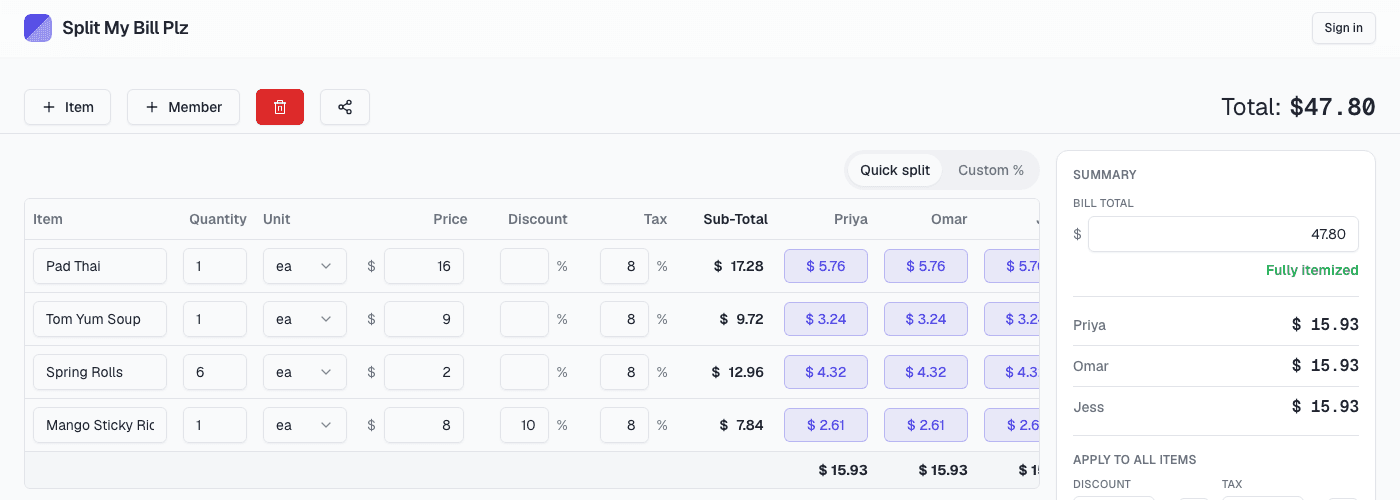
Type in what was ordered, with quantity, price, discount, and tax per line.
Add your people
Tap a name on any item to include them — the share divides evenly, automatically.
See who owes what
Totals update instantly as you go. No manual math, no arguments over the tip.
Itemized splitting
Add items with quantity, discount, and tax, set a target bill total and watch it count down as you go, then assign each person their exact share — down to the cent.
Export & share
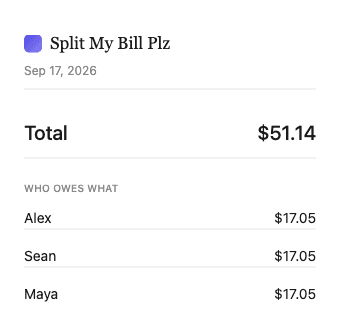
Download a receipt-style PDF or image, export to CSV, or copy a plain-text summary to paste straight into a chat.
Receipt scan auto-fill
Snap a photo of a receipt and let AI fill in the line items for you, ready to review before it’s added.
Natural language edits
“Split the pizza evenly between Alice and Bob” — just type it, no clicking through dropdowns.
Export your bill your way
Once everyone's shares are settled, send it however works best — a receipt-style PDF or image for the group chat, a CSV for your records, or a quick text summary.
- Plain-text summary, ready to paste into any chat
- CSV, for spreadsheets and expense tracking
- Receipt-style image, easy to screenshot and send
- Receipt-style PDF, for printing or archiving
Built for every kind of bill
Frequently asked questions
Do I need to create an account?+
No. Split My Bill Plz works instantly in your browser — no sign-up, no email, nothing to download.
Does it work without internet?+
Yes. Once the page has loaded a single time, splitting a bill needs no connection at all — handy on restaurant wifi. You can also add it to your home screen from your browser’s menu and it opens like any other app.
Is my data private?+
Everything is stored locally in your browser. Nothing about your bill is sent to or kept on a server.
Is it really free?+
Yes — free forever. No premium tier, no usage limits, no credit card required.
What about the AI features?+
Receipt scanning and chat-based edits are on the way, powered by a shared AI budget — so they’ll stay free too, with a fair monthly cap per person.